

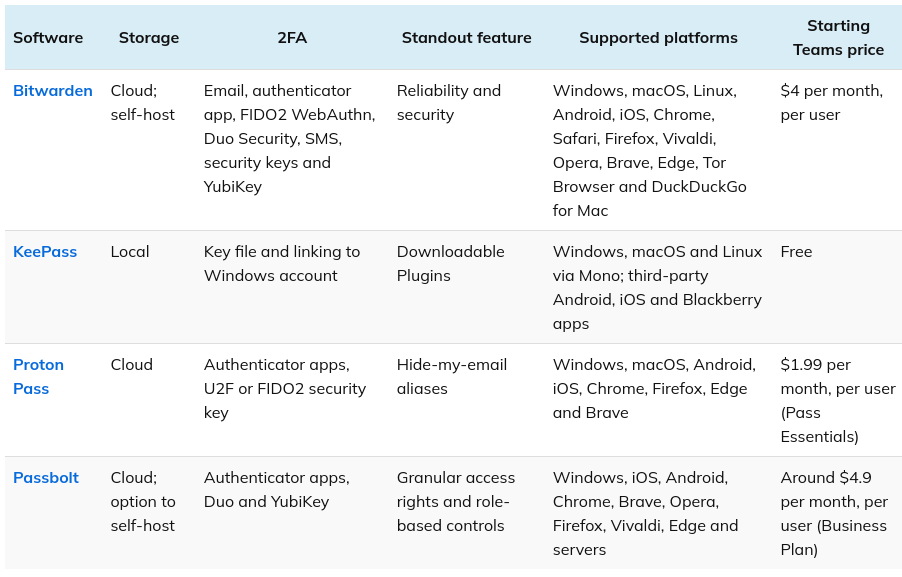
Bitwarden
Technology
Local encryption
Open-source
Cloud
Team-sharing:
Paid option. Suitable for personal use only
Import Export
CSV – Json
Device
MacOS | iOS | Windows | Android | Ubuntu | Serverless
Web-browser intergraion
Yes
Selfhosted
Yes
Ease of use
4/5
Enterprise use
4/5
Usage Recommendation
Personal – Free
Enterprise – Shelf-hosted
Reference link
4/5

KeepassXC
Technology
Local encryption
Open-source
Non-cloud – Enterprise control
Team-sharing:
Total Control
Import Export
CSV – Json
Device
MacOS | iOS | Windows | Android | Ubuntu | Serverless
Web-browser intergraion
Yes
Selfhosted
Yes
Ease of use
3.5/5
Enterprise use
4/5
Usage Recommendation
Personal – Free
Enterprise – Shelf-hosted or shared database
Reference link
Passbolt
Technology
Local encryption
Open-source
Non-cloud – Enterprise control
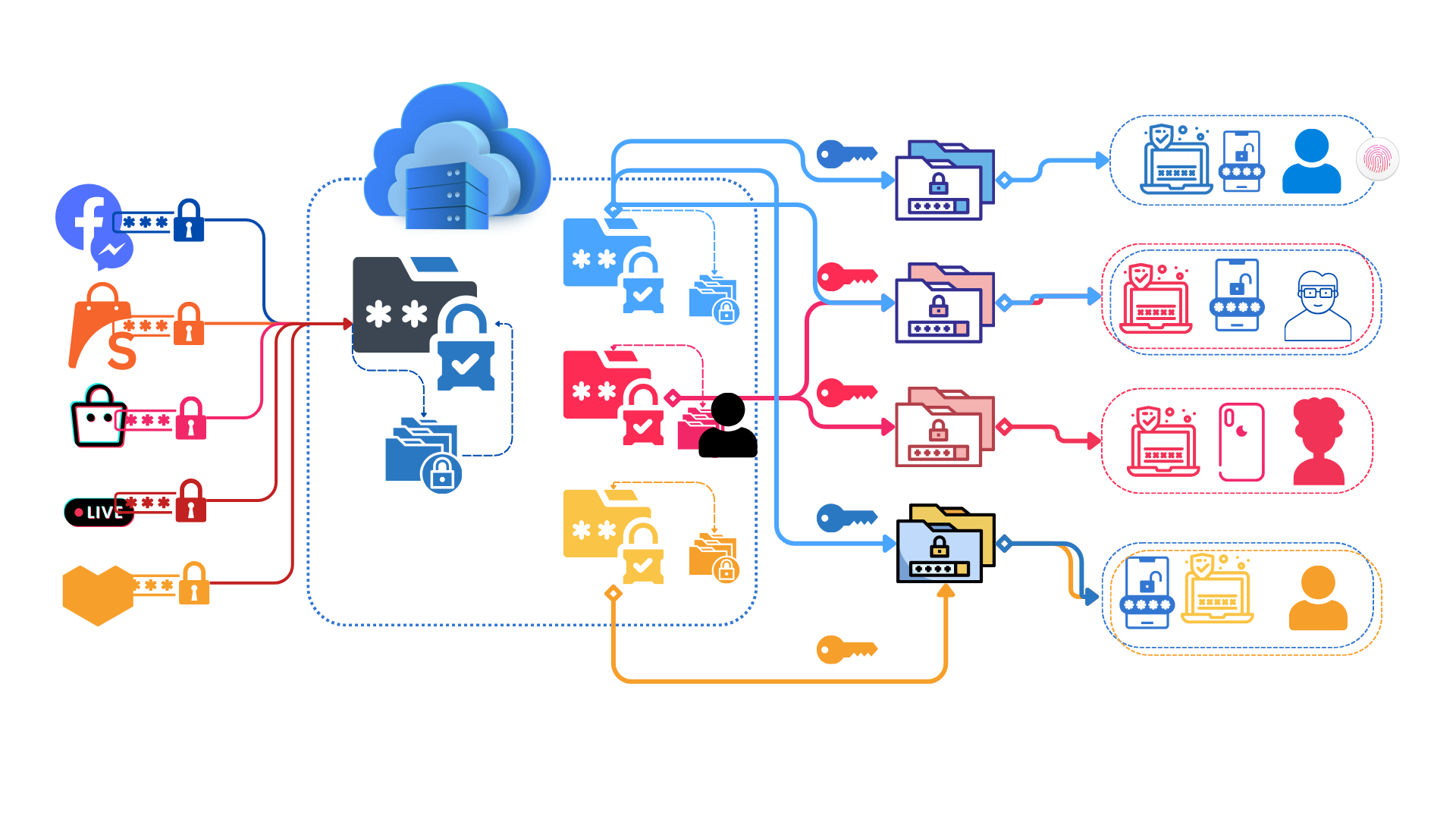
Team-sharing:
Total Control
Import Export
CSV – Json
Device
MacOS | iOS | Windows | Android | Ubuntu | Serverless
Web-browser intergraion
Yes
Selfhosted
Yes
Ease of use
4/5
Enterprise use
5/5
Usage Recommendation
Personal – Free
Enterprise – Shelf-hosted or shared databse
Reference link
For the agile team transitioning from spreadsheets / keepass / lastpass to team password management practices.
References
https://www.techrepublic.com/article/best-open-source-password-manager/
https://www.passbolt.com/passbolt-vs-keepass
https://www.passbolt.com/vs/bitwarden/overview
https://www.wired.com/story/best-password-managers/#selfhosted
Concerned questions
Here’s a comparison of Bitwarden Community (free, self-hosted) and a completely self-hosted Bitwarden server:
Bitwarden Community
Pros:
- Free: No ongoing cost for basic password management features.
- Easy Setup: Uses Docker containers for a streamlined setup process compared to full self-hosting.
- Official Support: Backed by the Bitwarden development team, offering some peace of mind.
- Community Features: Access to community forums and resources.
Cons:
- Limited Features: Lacks some premium features of Bitwarden paid plans, like secure file storage and emergency access.
- Reliance on Bitwarden Servers: Still relies on Bitwarden servers for some functionalities like password syncing and identity verification.
- Less Control: You don’t have complete control over the server environment or data location.
- Limited Support: Support is primarily through community forums, with less direct assistance compared to paid plans.
Self-Hosted Bitwarden
Pros:
- Full Control: You have complete control over the server environment, data location, and security configurations.
- Offline Access: Can function entirely offline, without relying on external servers.
- Privacy: Offers maximum privacy as your data is stored solely on your server.
- Customization: You can customize the server to suit your specific needs.
Cons:
- Technical Expertise Required: Setting up and maintaining a self-hosted server requires technical knowledge and ongoing management effort.
- Security Responsibility: You are solely responsible for server security and updates, increasing the risk of vulnerabilities.
- No Official Support: No direct support from Bitwarden developers. You’ll rely on community resources and your own troubleshooting skills.
- Cost: Requires additional resources like server hardware or cloud hosting.
Choosing Between Them
- For Basic Users: If you’re a casual user who prioritizes ease of use and doesn’t need advanced features, Bitwarden Community is a good option.
- For Security-Conscious Users: If you value complete control over your data and prioritize maximum privacy, self-hosting Bitwarden might be a better choice, but requires technical expertise.
- For Businesses: Businesses should generally consider paid Bitwarden plans with additional security features, centralized management, and official support.
Additional Considerations
- Security Expertise: Evaluate your technical skills and comfort level with server management before self-hosting.
- Server Resources: Ensure you have adequate server resources (storage, processing power) to handle your password vault size and potential user base (if applicable).
- Backup Strategy: Implement a robust backup plan for your self-hosted Bitwarden server to prevent data loss.
Passbolt Community vs. Self-Hosted Passbolt
Here’s a comparison of Passbolt Community (free, self-hosted) and a completely self-hosted Passbolt server:
Passbolt Community
Pros:
- Free: No ongoing cost for basic password management features.
- Open Source: Code is open-source, allowing for transparency and customization.
- Easy Setup (compared to full self-hosting): Uses Docker containers for a streamlined setup process.
- Community Features: Access to community forums and resources.
Cons:
- Limited Features: Lacks some features available in Passbolt Pro plans, like password inheritance and advanced sharing options.
- Limited Support: Support is primarily through community forums, with less direct assistance compared to paid plans.
- Reliance on Passbolt Servers: Still relies on Passbolt servers for some functionalities like anonymous sign-up and background tasks.
Self-Hosted Passbolt
Pros:
- Full Control: You have complete control over the server environment, data location, and security configurations.
- Offline Access: Can function entirely offline, without relying on external servers.
- Privacy: Offers maximum privacy as your data is stored solely on your server.
- Customization: You can customize the server to suit your specific needs.
Cons:
- Technical Expertise Required: Setting up and maintaining a self-hosted server requires technical knowledge and ongoing management effort.
- Security Responsibility: You are solely responsible for server security and updates, increasing the risk of vulnerabilities.
- No Official Support: No direct support from Passbolt developers. You’ll rely on community resources and your own troubleshooting skills.
- Cost: Requires additional resources like server hardware or cloud hosting.
Choosing Between Them
- Basic Users: If you’re a casual user who prioritizes ease of use and doesn’t need advanced features, Passbolt Community is a good option.
- Security-Conscious Users: If you value complete control over your data and prioritize maximum privacy, self-hosting Passbolt might be better, but requires technical expertise.
- Teams: Even for small teams, Passbolt Community’s limitations on sharing and inheritance might be restrictive. Consider the Passbolt Teams plan for these features.
Additional Considerations
- Security Expertise: Evaluate your technical skills and comfort level with server management before self-hosting.
- Server Resources: Ensure you have adequate server resources (storage, processing power) to handle your password vault size and potential user base (if applicable).
- Backup Strategy: Implement a robust backup plan for your self-hosted Passbolt server to prevent data loss.
Compared to Bitwarden Community:
- Passbolt Community offers full open-source code, which some users might prefer for transparency and potential customization.
- However, self-hosting Passbolt might be slightly more complex to set up compared to Bitwarden Community’s Docker container approach.
Ultimately, the best choice depends on your specific needs and priorities. Consider the trade-offs between ease of use, feature availability, control, and privacy.
Bitwarden Community, the free, self-hosted version of Bitwarden, has limitations on how you can share your password vault with others. Here’s a breakdown of its sharing capabilities:
Limitations:
- No Built-in Sharing: Bitwarden Community doesn’t have built-in functionalities for directly sharing your password vault with other users.
Alternative Sharing Methods (Workarounds):
- Manual Sharing: You can manually export your vault data as a CSV file and share it with others. However, this method is not ideal due to security concerns and lack of automatic updates. The recipient would need to import the CSV into their own password manager.
- Organization Feature (Limited Use): While Bitwarden Community allows creating Organizations, a feature typically used for collaboration, it’s intended for the same self-hosted instance. This means you can’t add users from outside your server to an Organization for sharing.
Important Considerations:
- Security Risks: Manually sharing your vault data as a CSV file exposes your passwords in plain text during transfer. This is a significant security risk and not recommended.
- Usability Issues: Manually sharing and updating CSV files is cumbersome and lacks features like automatic updates for password changes.
Alternatives for Secure Sharing:
- Upgrading to Bitwarden Paid Plans: Bitwarden offers paid plans with built-in secure sharing features. You can create Collections within your vault and share them with specific users. Shared Collections automatically update for everyone with access, ensuring everyone has the latest passwords.
- Using a Different Password Manager: Some password managers, even free ones, might offer built-in secure sharing functionalities. Consider exploring other options that cater to your specific sharing needs.
Overall:
Bitwarden Community offers a good solution for basic password management for a single user. However, its limitations in secure vault sharing make it less suitable for scenarios where you need to share passwords with others. Upgrading to a paid Bitwarden plan or exploring alternative password managers with built-in sharing features might be a better option if collaboration is a requirement.
Passbolt Community, the free, self-hosted version of Passbolt, offers more sharing capabilities compared to Bitwarden Community, but still has limitations compared to paid plans. Here’s a breakdown:
Sharing Features:
- Groups: You can create groups in Passbolt Community and assign users to those groups. This allows you to share passwords with a specific group of people, improving manageability compared to individual sharing.
- Permissions: You can set different permission levels for users within groups. Options typically include “View Only” or “View and Edit” access to passwords within the group.
Limitations:
- Limited User Management: Compared to Passbolt Pro plans, Passbolt Community has limitations on user management. You cannot create individual user accounts within the groups. Users need to be pre-existing on the Passbolt Community server instance.
- No Guest Users: You cannot invite external guest users who are not already on your server. Sharing is restricted to existing users and groups.
- Advanced Sharing Features Missing: Features like password inheritance (granting access upon user departure) and granular sharing controls (specific password visibility) are absent in Passbolt Community.
Overall:
Passbolt Community provides a more secure and manageable way to share passwords with groups compared to Bitwarden Community’s limitations. However, it might not be ideal for scenarios requiring:
- Sharing with External Users: If you need to share passwords with people outside your self-hosted server, Passbolt Community isn’t suitable.
- Advanced Sharing Controls: Features like password inheritance and granular access control are missing in the free version.
Alternatives for Advanced Sharing:
- Upgrading to Passbolt Teams: Consider upgrading to Passbolt Teams, which offers guest user invitations, advanced sharing controls, and inheritance features.
- Alternative Password Managers: Explore other password managers with free plans that cater to your specific sharing needs, especially if guest access or granular control is important.
Here’s a quick comparison table summarizing the key points:
| Feature | Bitwarden Community | Passbolt Community |
|---|---|---|
| Built-in Sharing | No | Yes (Groups) |
| User Management | N/A | Limited |
| Guest Access | No | No |
| Sharing Permissions | N/A | View/Edit (Groups) |
| Advanced Sharing Features | No | No |
Here’s a comparison of Bitwarden and Passbolt’s pricing and packages:
Bitwarden
Free Plan:
- Ideal for individual users.
- Includes unlimited passwords, secure storage, and access across devices.
- Lacks features like secure file storage, emergency access, and password sharing.
Premium Plans (Individual):
- Premium ($10 per year): Offers all features of the free plan, plus secure file storage (up to 1GB), password sharing with collections, and priority customer support.
- Family ($4 per user per month, minimum 5 users): Ideal for families. Includes all features of Premium, plus family organization and shared collections.
Business Plans:
- Business ($3 per user per month): Designed for small businesses. Includes all features of Premium, plus centralized admin dashboard, user management, audit logs, and HIPAA compliance.
- Enterprise (Custom pricing): Caters to larger organizations. Offers advanced features like SSO integration, security policies, and dedicated customer support.
Passbolt
Free Plan (Self-Hosted):
- Requires technical expertise to set up and maintain your own server.
- Offers basic password management but lacks features like password inheritance, advanced sharing controls, and mobile apps (might require additional configuration).
Paid Plans:
- Teams (€1 per user per month, minimum 5 users): Ideal for small teams. Includes features like user invitations, group management, basic sharing permissions, and mobile apps.
- Business (€3 per user per month): Designed for businesses. Offers all features of Teams, plus advanced sharing controls, password inheritance, audit logs, and SSO integration.
- Enterprise (Custom pricing): Caters to large organizations. Provides features like dedicated support, custom branding, and compliance certifications.
Here’s a table summarizing the key differences:
| Feature | Bitwarden | Passbolt |
|---|---|---|
| Free Plan | Basic password management | Self-hosted, technical expertise required |
| Free Plan Limitations | No sharing, file storage | Limited features, mobile app limitations |
| Premium Plans (Individual) | Sharing, file storage, priority support | N/A |
| Family Plans | Family organization, shared collections | N/A |
| Business Plans | Centralized admin, user management, HIPAA compliance | Teams, advanced sharing, SSO integration (Business) |
| Enterprise Plans | Custom features, dedicated support | Custom features, dedicated support, compliance certifications |
Choosing Between Them
- Ease of Use: Bitwarden offers a user-friendly interface and doesn’t require server management (except Enterprise plans). Passbolt’s free plan requires self-hosting, making it less beginner-friendly.
- Sharing Features: Bitwarden offers built-in sharing with collections in paid plans. Passbolt’s free plan has limited sharing, while paid plans offer more control and guest access.
- Cost: Bitwarden’s free plan is more feature-rich compared to Passbolt’s self-hosted option. However, Passbolt’s Teams plan might be more cost-effective for small teams.
- Control: Passbolt offers complete control over your data with self-hosting (if technically skilled). Bitwarden stores your data on their servers.
Additional Considerations
- Technical Expertise: Consider your technical skills if opting for Passbolt’s self-hosted option.
- Team Size: Bitwarden’s Family plan caters to families, while Passbolt focuses on teams with its paid plans.
- Security Needs: Both services offer strong security features. Evaluate your specific security requirements.
Ultimately, the best choice depends on your needs and priorities. Consider factors like ease of use, sharing requirements, budget, and desired level of control over your data.
Bitwarden is committed to keeping your sensitive data secure both at work and at home. As part of that dedication, Bitwarden allows all members of Enterprise Organizations to redeem a complimentary Families Plan with their personal email address.
The free Families Plan allows you and up to five additional accounts (6 accounts total) to take advantage of premium features as well as share items with other members of your Families Organization.
Bitwarden:
- Mobile App Available: Yes, Bitwarden offers a fully functional mobile app for Android and iOS in their community edition.
- Benefits: Easy access to your password vault on the go, convenient autofill for logins on mobile apps and websites.
- Setup: Requires creating an account on Bitwarden servers (even for the community edition).
Passbolt:
- Mobile App (Community Edition): No official mobile app is directly available for the Passbolt community edition.
- Workarounds:
- Web App: You can access your Passbolt vault through the web browser on your mobile device. The web app might not offer the same user experience as a dedicated mobile app.
- Third-Party Apps (Unofficial): Some unofficial third-party apps claim compatibility with Passbolt self-hosted servers. However, using such apps introduces security risks and is not officially supported by Passbolt.
Here’s a table summarizing the key points:
| Feature | Bitwarden Community Edition | Passbolt Community Edition |
|---|---|---|
| Mobile App | Yes (Android & iOS) | No |
| Benefits | Easy mobile access, autofill | Web access only (limited) |
| Setup | Account creation required | Self-hosted server required |
| Security Risk | Lower (official app) | Higher (web app or unofficial apps) |

https://keeweb.info : for all device web, laptop devices, Android
Home